
Interactive Workbook
Pick your lane
Pick your lane based on where you are with Claude. The page unlocks for that lane only. Check the boxes as you go, they add up.
Haven't taken Claude for Beginners yet? Pick one of the first two.
Step 1: Three things to check
Use a web browser at claude.ai. Windows and Mac look the same there. A free Claude account works for everything in lanes one and two.
-
Sign in
Open claude.ai. Your name should show in the bottom left corner. If it says Log in, sign in first.
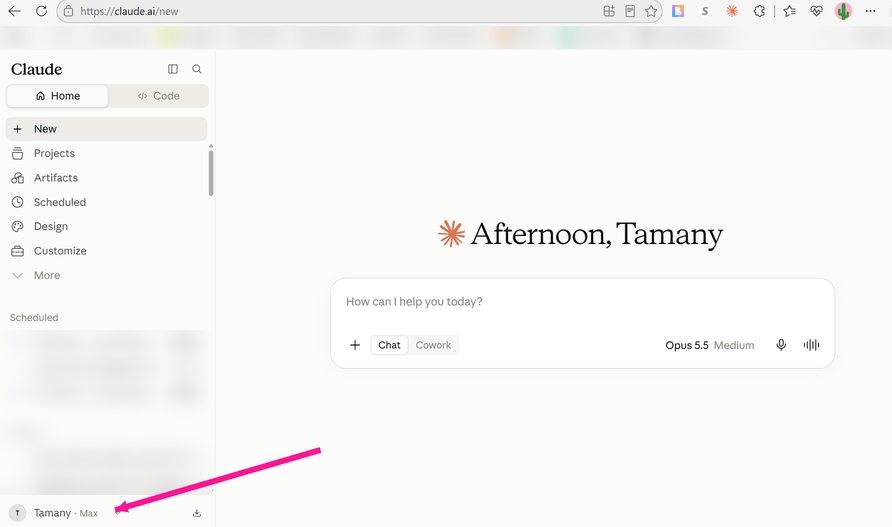
Your name in the bottom left corner means you're signed in.
Check as you go
-
Turn on one setting
Click your name in the bottom left corner, then Settings.
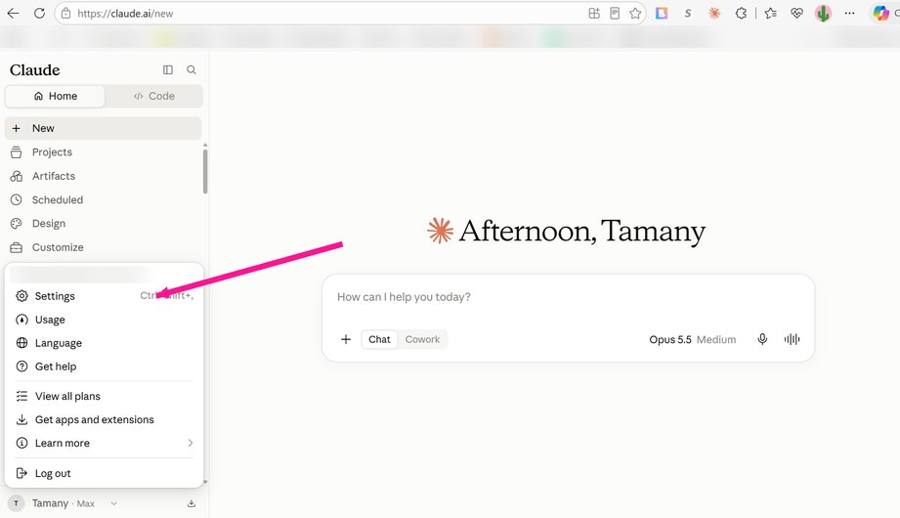
The menu that opens when you click your name. Settings is at the top.
Click Capabilities in the left list. Scroll to Cloud code execution and file creation and make sure it's on (blue).
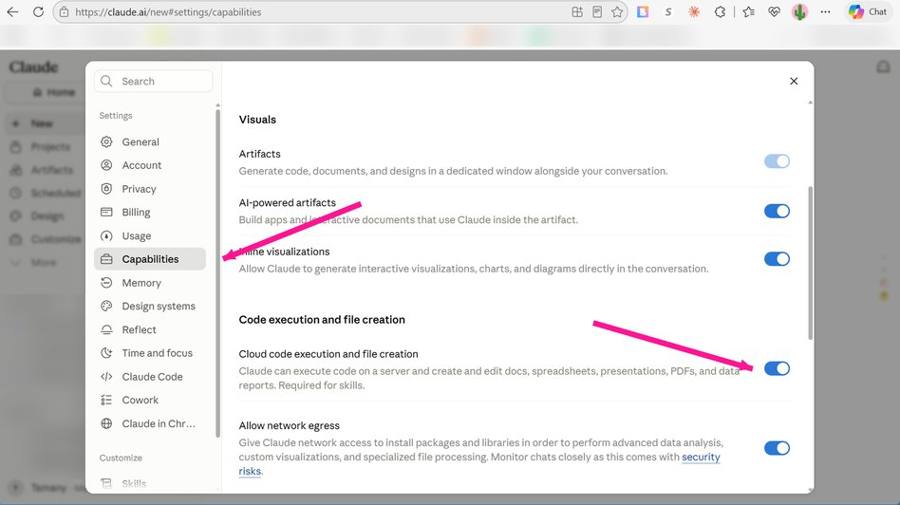
Capabilities, with Cloud code execution and file creation turned on.
Check as you go
First screenshotSecond screenshot -
Keep your workbook email open
The email that sent you this workbook also has your Realtor Council in it: a name, a description, and the instructions. Keep that email open in another tab. You'll copy and paste from it in Step 4.
Check as you go
Step 2: Your Claude Business Snapshot
Type your answers in the boxes. The gray text is only an example. Nothing here gets saved or sent anywhere, it only builds text for you to copy.
List them all. Claude can only talk about the areas you tell it about.
Tap everything that's true.
The kind of dealPick 3.
- A recent Instagram caption
- A text you sent a client
- An email you sent a client
- A listing description you wrote yourself
- A voice memo you transcribed
Google, Zillow, a thank-you text. Claude learns what people actually love about working with you.
- "I grew up here and know every neighborhood by the school it feeds."
- "I answer my phone. My clients always know what's happening next."
- "I've helped 40 military families relocate in the last three years."
Step 3: Put it in a Project
-
Make it
At claude.ai, click Projects in the left sidebar, then the black New project button, top right.
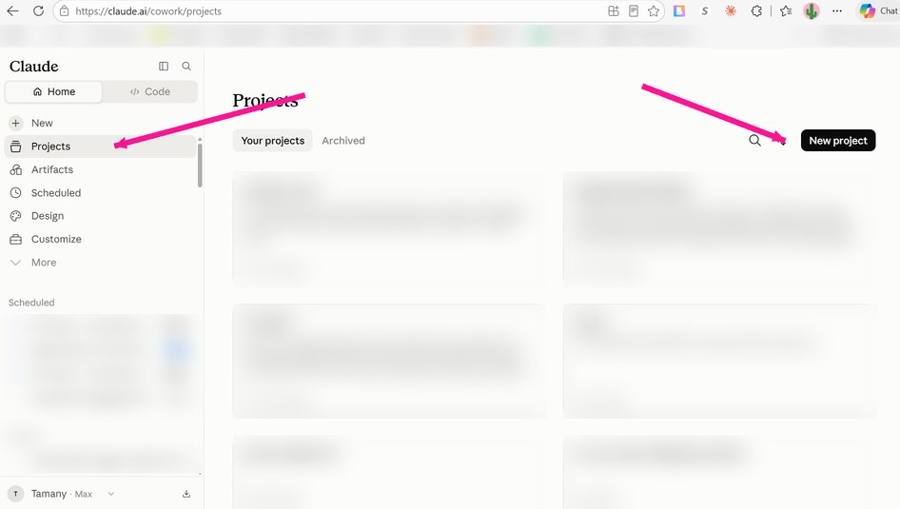
Projects page. New project is the black button, top right.
Under What are you working on? type Real Estate Assistant. Under What are you trying to achieve? type this one line and nothing else: Help me run and market my real estate business. (Your Snapshot does NOT go here. Next step.) Click Create project.
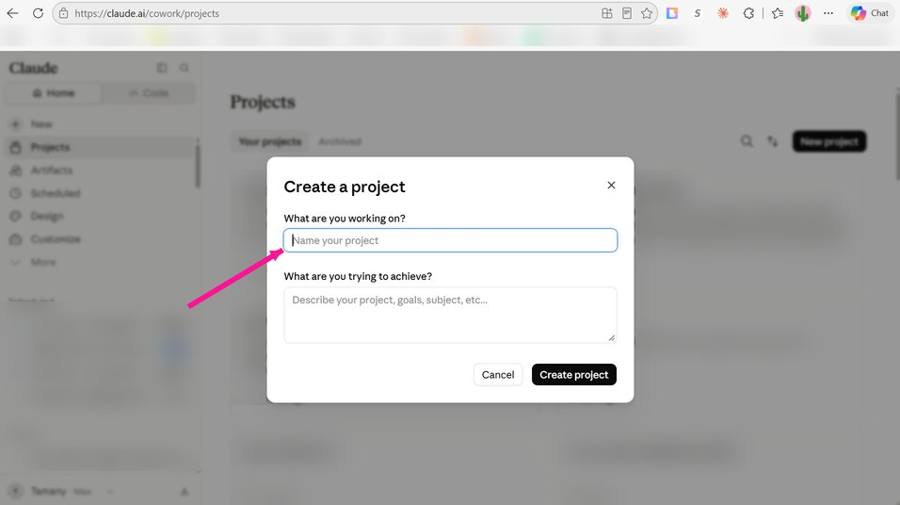
The Create a project popup. Name goes in the first box.
Check as you go
-
Paste your Snapshot into Instructions
Your new project opens. On the right side, find Instructions and click the +. Paste your Snapshot in the big box. Click Save instructions.
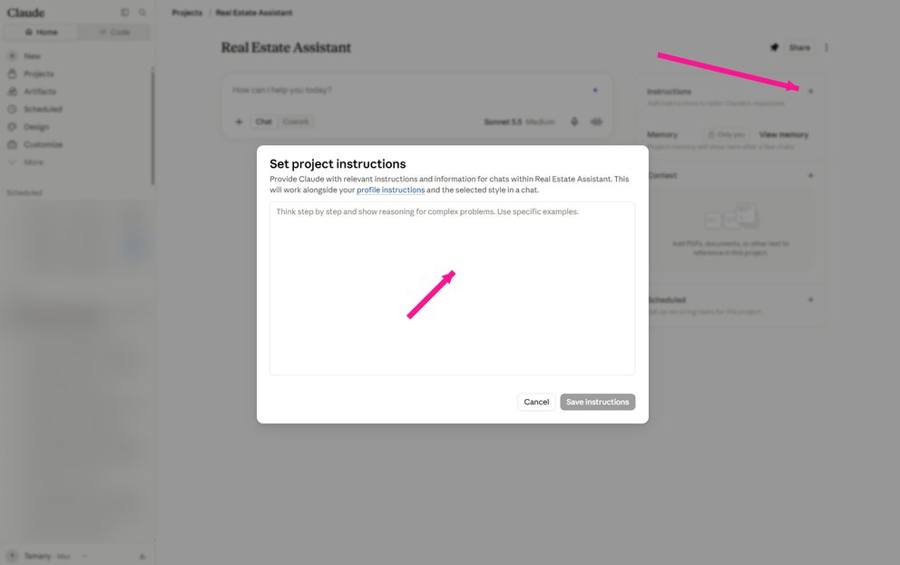
The Instructions box. Your Snapshot goes here, then Save instructions.
Check as you go
-
First ask
The big box that says How can I help you today? is where you ask for things, in plain English, like texting a friend who happens to be a marketing assistant. Tap Copy on one of the four prompts below and paste it there.
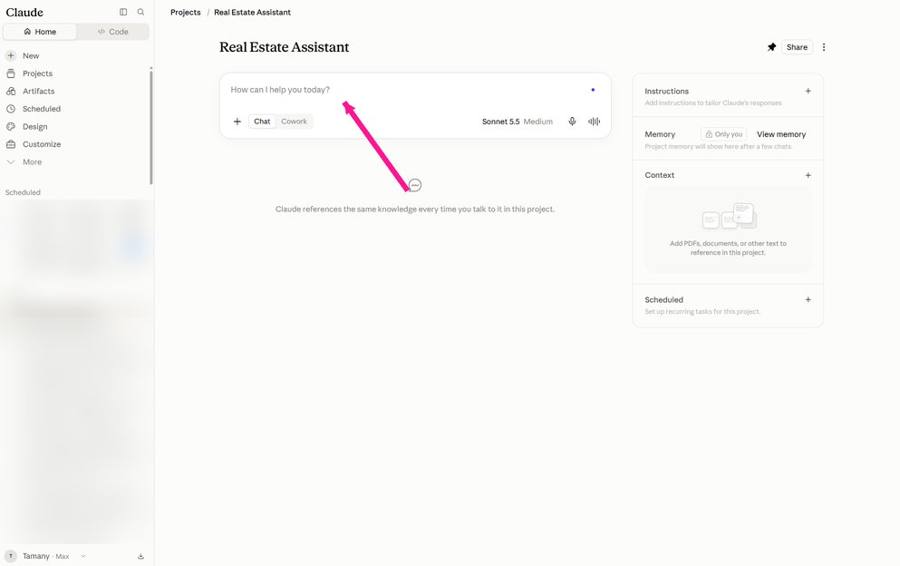
The chat box inside your Project. Type here.
- Write me a text to send a past client I haven't talked to in 6 months. Keep it short and sound like me.
- Give me 5 Instagram post ideas for this week that only an agent in my area could post.
- Rewrite my Instagram bio in my tone. Ask me for my current bio first.
- Write a 3-sentence intro I can send to a new lead who just filled out my website form.
Before you hit Enter: look at the bottom of the chat box. The model should say Sonnet and the effort should say Medium. That saves your tokens. Then hit Enter.Check as you go
Step 4: Add the Realtor Council
The Realtor Council is a skill I handwrote for agents. It puts five advisors in the room every time you have a decision with no obvious right answer.
Where did this come from?
Andrej Karpathy, one of the founders of OpenAI, built something he called the LLM Council: ask the same question to several AIs, have them review each other's answers, then let a Chairman read everything and give one final call. I took that idea and rewrote the five voices so every one of them thinks like someone in real estate. Same structure, built for your business.
-
Customize, then Add, then Create a skill
In the left sidebar click Customize. Stay on the Skills tab. Top right, click Add, then Create a skill.
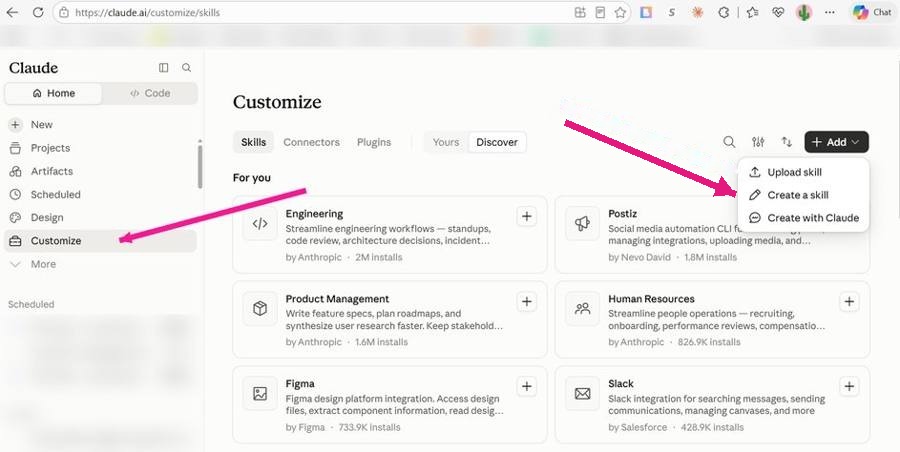
Customize, Skills tab, Add menu open. Pick Create a skill.
Check as you go
-
Three boxes, three pastes
From the Realtor Council doc, copy and paste each piece into its box. Name goes in the first box: realtor-council. Description goes in the second box. Everything after that, about six pages of it, goes in the third big text area. Select all of it, down to the very last line. Save.
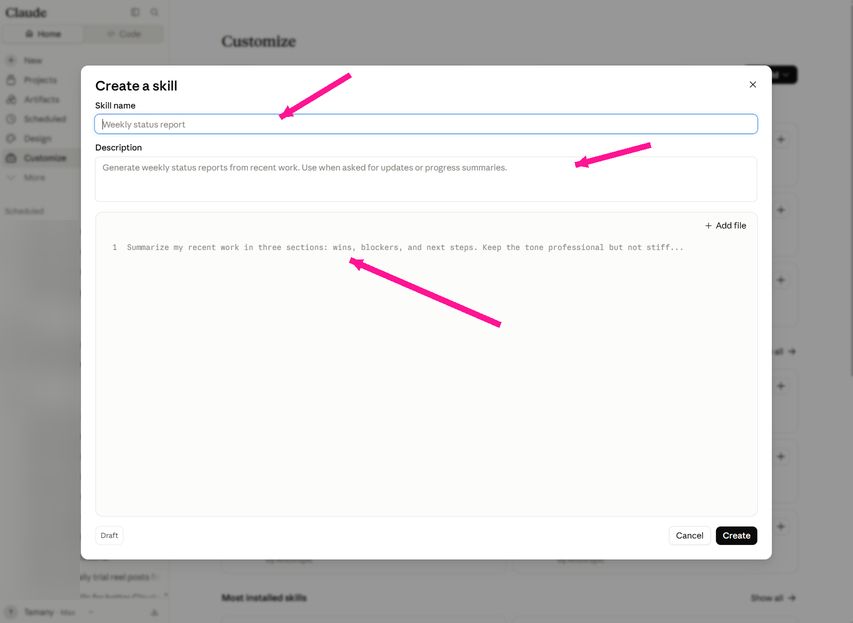
Create a skill. Name on top, Description under it, Instructions in the big box.
Check as you go
-
Run it once
Back in your Real Estate Assistant project, start a new chat and paste this.
- Run the Realtor Council on this decision: [type a decision you're stuck on]. Give me each advisor's take, where they disagree, and a final call.
OptionalCan't think of a decision? Borrow one:
Show my face more, or keep it to listingsStart a monthly newsletter or notNiche down or stay generalHire a VA now or after the new yearCheck as you go
This is the starter version
Five boxes gets Claude in the right neighborhood. In my Claude for Beginners session we build the full profile together live, I add the Realtor Council with you side by side so nobody gets stuck, then we run it on your real business and you watch the answers get sharper. Plus, attendees get $150+ worth of Claude resources I've made.
See Claude for Beginners datesStart here: Claude for Chrome reads your Instagram Insights
-
Install it
In Chrome, go to claude.com/download. Scroll down to the Go further section. Under Claude extensions, click Install next to Chrome. Sign in with your Claude account.
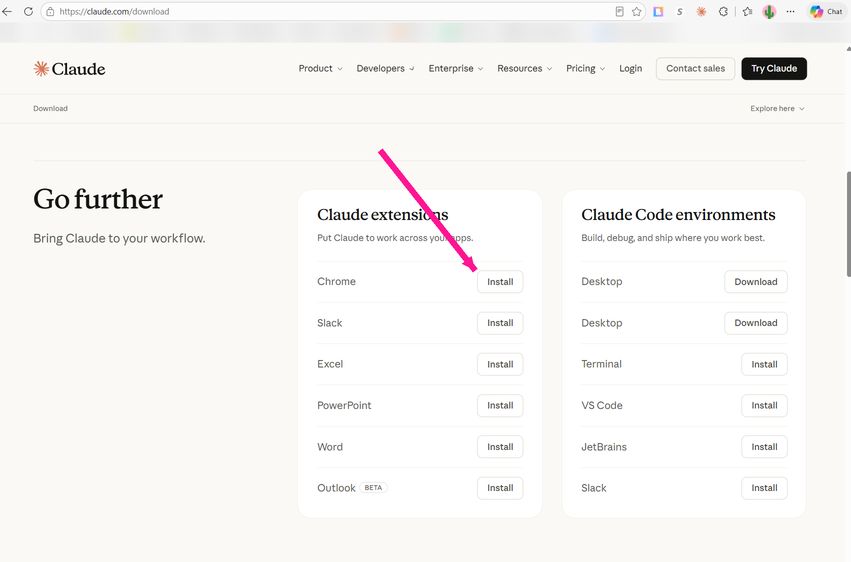
claude.com/download. Scroll to Go further, then Install next to Chrome.
Check as you go
-
Open Instagram, open Claude, paste the ask
Log in to instagram.com on your computer (not your phone) and open your profile. Click the Claude icon in your Chrome toolbar, top right. A side panel opens. Paste this in the box at the bottom of that panel:
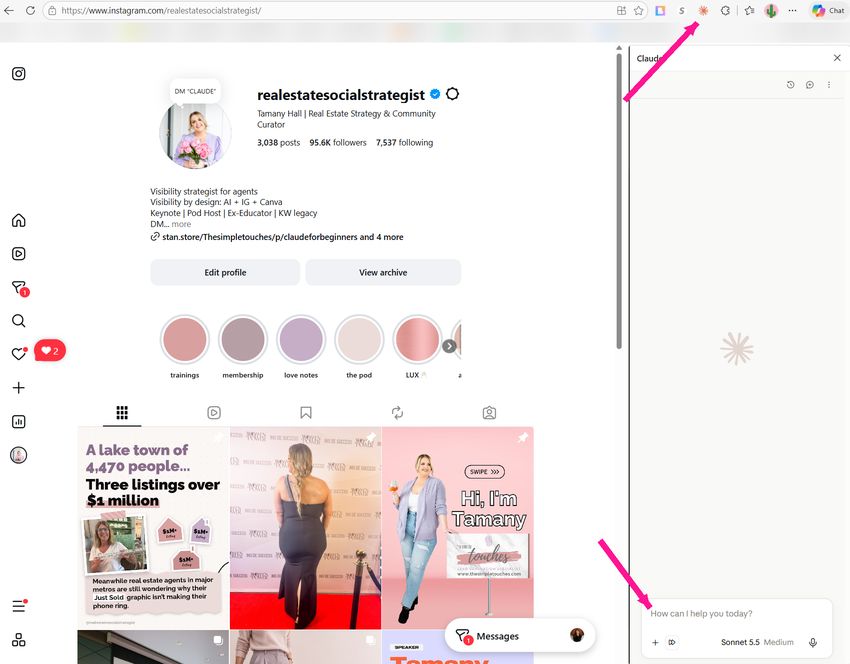
Your Instagram profile with the Claude side panel open. The icon is in the toolbar, the box is at the bottom of the panel.
- Read my Insights for the last 30 days. Tell me which three posts worked best and why, then give me three specific ways to get more leads from my content.
Check as you go
With the time you have left: 10 decisions the Council was built for
You already have the Realtor Council from Claude for Beginners. It's at its best when there's no clean right answer, only tradeoffs. Pick 2 to run now, the two that have been nagging you. Fill in the brackets, paste into your project, and let the five of them argue it out. The rest are here whenever you need them.
- Your friend wants you to list her house 8% over what the comps saySay yes and it sits. Say no and it strains the friendship. There's a third path and the Council will find it.Run the Realtor Council. Situation: a close friend wants me to list her home at [$X]. My comps say [$Y]. Market in [my area] right now: [days on market, inventory]. Our relationship: [how close, how long]. Options on the table: take it at her price with a 30-day reduction agreement, take it at my price, or refer it out. Give each advisor's take, where they disagree, the risk to the friendship and to my reputation, and a final call with the exact words I'd say to her.
- $3,000 this quarter: client event, Meta ads, or a videographerAll three can work. The right one depends on your database, your market, and what you'll actually follow through on.Run the Realtor Council. I have $3,000 to spend on business growth this quarter. Database size: [#]. Past clients I've stayed in touch with: [rough %]. Current Instagram following and average reach: [#]. Options: a client appreciation event, Meta ads for [buyer or seller leads], or hiring a videographer for [#] months. What I tend to follow through on: [be honest]. Give each advisor's pick, what each option needs from me to work, and a final call with a rough spend breakdown.
- Join a team or stay soloMore leads and less freedom, or more freedom and a slower build. Five advisors will show you the tradeoffs you're not seeing.Run the Realtor Council. I'm deciding between joining [team name or type] and staying solo. My production last 12 months: [#] closings, [$] GCI. Team offer: [split, lead flow, requirements]. What I'd give up: [brand, autonomy, commission]. Why I'm tempted: [honest reason]. Why I'm hesitant: [honest reason]. Give each advisor's position, the questions I should ask the team lead before deciding, and a final call with conditions.
- Switch brokerages now or after Q4Timing is the whole question. Pending deals, holiday slowdown, and a brand reset all pull in different directions.Run the Realtor Council. I'm considering moving from [current brokerage] to [new brokerage]. Deals currently pending: [#, closing dates]. Why I want to move: [reasons]. What the new brokerage offers: [split, support, brand]. My concern about moving now: [concern]. Give each advisor's take on timing (now, January, or later), what I'd need to protect before I move, and a final call.
- Your buyer wants to offer 12% under asking on a house they lovePush back too hard and you look like you're chasing commission. Don't push at all and they lose the house. Where's the line?Run the Realtor Council. My buyer wants to offer [$X] on a home listed at [$Y]. Days on market: [#]. Comparable sales: [summary]. How much they love it: [1 to 10]. Their budget ceiling: [$]. Seller situation if known: [motivated, relocating, etc.]. Give each advisor's read on the offer, how to present the risk to my buyer without steering them, and a final call on what to say and what to offer.
- Fire a difficult client mid-transaction or finish itYour time, your sanity, and your reputation are all on the table. The Council weighs all three.Run the Realtor Council. I'm working with a client who [describe the behavior]. We're at [stage of the transaction]. Commission at stake: [$]. What I've already tried: [answer]. How it's affecting my other clients and my week: [answer]. Give each advisor's take, a script for a reset conversation if that's the call, a clean exit plan if that's the call, and a final call.
- Start a YouTube channel or double down on InstagramOne is compounding and slow. One is where your people already are. You only have so many hours.Run the Realtor Council. I'm deciding whether to start a YouTube channel or put that same time into Instagram. Hours per week I can give to content: [#]. Current Instagram following and reach: [#]. My comfort on camera: [1 to 10]. My market and who I help most: [from my Snapshot]. What I want from content in 12 months: [leads, listings, brand]. Give each advisor's take, what each platform would demand from me weekly, and a final call with a 90-day plan.
- Hire a photographer on every listing or only someEvery listing looks better with pro photos. Not every listing pays for them.Run the Realtor Council. I'm deciding whether to pay for professional photos on every listing or set a price floor. Photographer cost per listing: [$]. My average listing price: [$]. Listings per year: [#]. What happens to my brand when a lower-priced listing goes up with phone photos: [honest]. Give each advisor's position, a rule I can apply without thinking, and a final call.
- Post honestly about the slow market or keep it upbeatHonest builds trust and can spook sellers. Upbeat keeps energy up and can sound fake. Your audience decides which one you can afford.Run the Realtor Council. My market is [describe: slower, prices softening, buyers cautious]. My audience is mostly [buyers, sellers, past clients, other agents]. My brand tone: [from my Snapshot]. I'm deciding whether to post straight talk about the slowdown or keep content upbeat. Give each advisor's take, three post angles that are honest without being gloomy, and a final call on the tone for the next 30 days.
- Take the starter home that closes fast or the luxury listing that may sitSure money now against a bigger check later, if it ever comes. Your calendar can only hold one.Run the Realtor Council. I can only take one of two listings this month. Option A: a [$] starter home in [area], likely to sell in [days]. Option B: a [$] luxury listing in [area], days on market for comps: [#], with [seller expectations]. My cash situation this quarter: [honest]. What each does for my brand: [honest]. Give each advisor's take, the risks I'm not seeing, and a final call.
Keep building
Every skill I hand you is handwritten by me, worked and reworked until it does the job for a real estate business. Two ways to get the next one.
Two minutes for me?
Form not showing? Open it in a new tab.